Data Mapping
Addressing the users' most critical pain point in a highly technical domain.
Overview
Adverity's data integration platform helps marketing teams connect, transform, and visualize data from hundreds of sources. Data mapping (the process of defining how raw fields from a source translate into a unified schema) is the most powerful yet most complex feature in the product.
The company follows the Shape Up methodology for product discovery, which involves defining actionable, team-aligned problem scopes for pitching. In 5 discovery sessions, the cross-functional team of 8 people was able to solve one of the biggest problems users face when trying to harmonize data across sources to make it comparable.
Problem Space
Despite its critical role in harmonizing data, the data mapping experience presented usability barriers that limited adoption and trust. Many usability sessions showed that users struggled to understand core concepts like source vs. target fields, and often bypassed Default Data Mapping due to low visibility or confidence. This led to manual work, inconsistent results, and reduced value from automation.
Systemic UX pain points in the schema mapping flow included:
- Confusing terminology (e.g. target vs. schema vs. field)
- Lack of contextual guidance and help
- Fractured user flow requiring navigation between multiple pages
- Low adoption of automation features like Default Mapping
- No visibility into schema usage across datastreams
The goal was to maximize the likelihood that users adopt the default schema settings - so they don't have to configure them manually - while simultaneously minimizing the time, clicks, and effort required to standardize any remaining non-default columns.
Discovery
In our team, we facilitated a series of cross-functional Double Diamond workshops to uncover deep usability challenges in schema standardization, synthesized and prioritized ideas, which eventually helped me map ideas into actionable UX concepts, and deliver interactive prototypes of the proposed solutions.
Using job mapping and Shape Up methodology, we aligned product, UX, customer success and engineering teams around eight key user workflows - from identifying the need to standardize, to verifying consistency across destinations. This resulted in a clear articulation of friction points (schema duplication, manual mapping effort, inconsistent defaults) and enabled us to prioritize scalable interventions with high adoption potential.
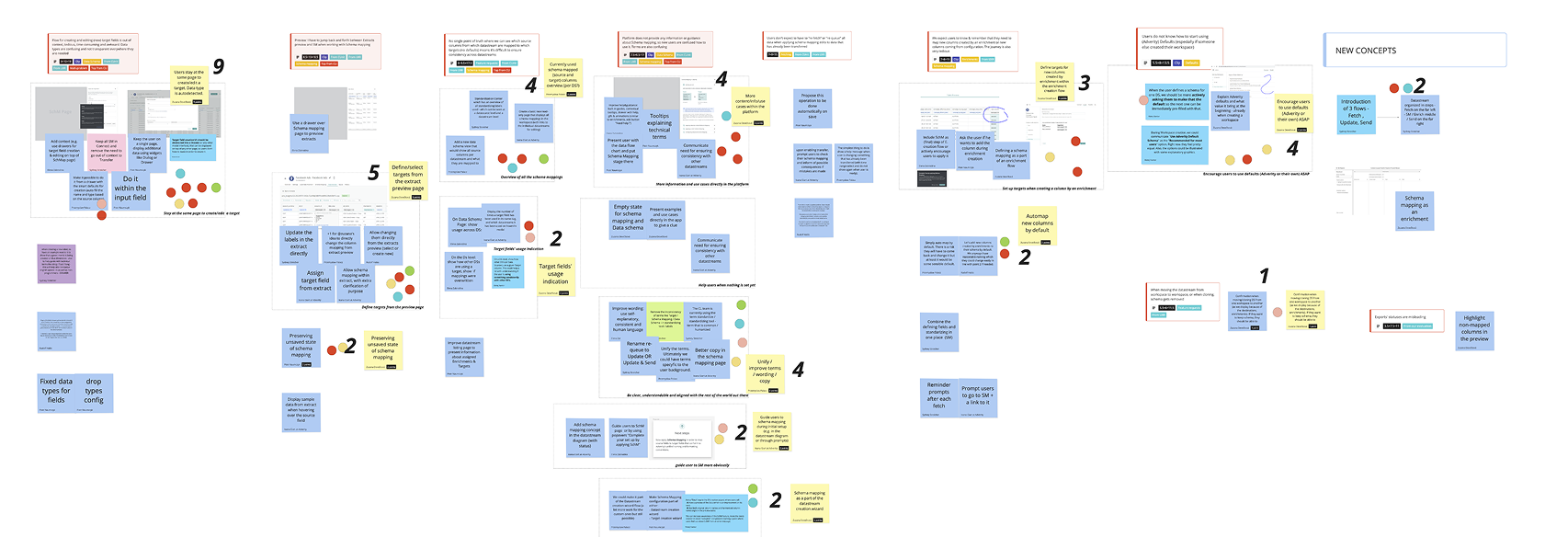
In the final stage of the discovery, we ran a quick dot-voting session on the solution ideas to turn a long list into a ranked backlog. The top cluster was all about keeping users “in context”: stay on the same page to create or edit a target, and define or select targets directly from the extract preview. In the next two discovery sessions, we reviewed and pressure-tested my solution proposals for these areas with stakeholders.
We mapped the voted ideas into actionable UX concepts:
- In-context schema editing via drawers or inline preview
- Schema mapping as part of the datastream creation wizard
- Auto-mapping and smart defaults for enrichment-created columns
- A centralized view of schema usage across sources
- Unified, humanized language and improved help mechanisms
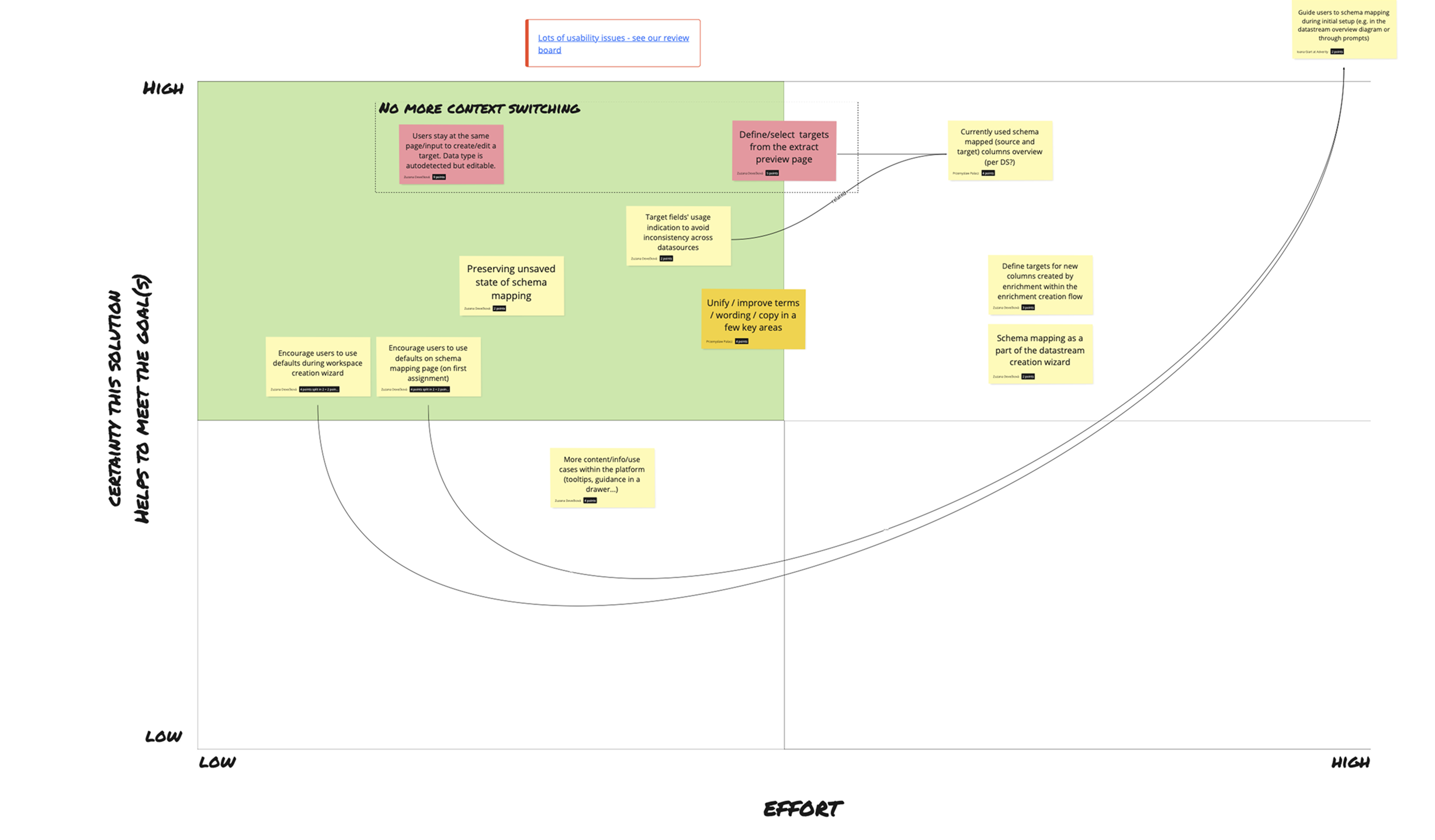
These went into a prioritization matrix (certainty vs. effort), clustered under the north-star theme “No more context switching.”
Solution - In-table Data Mapping
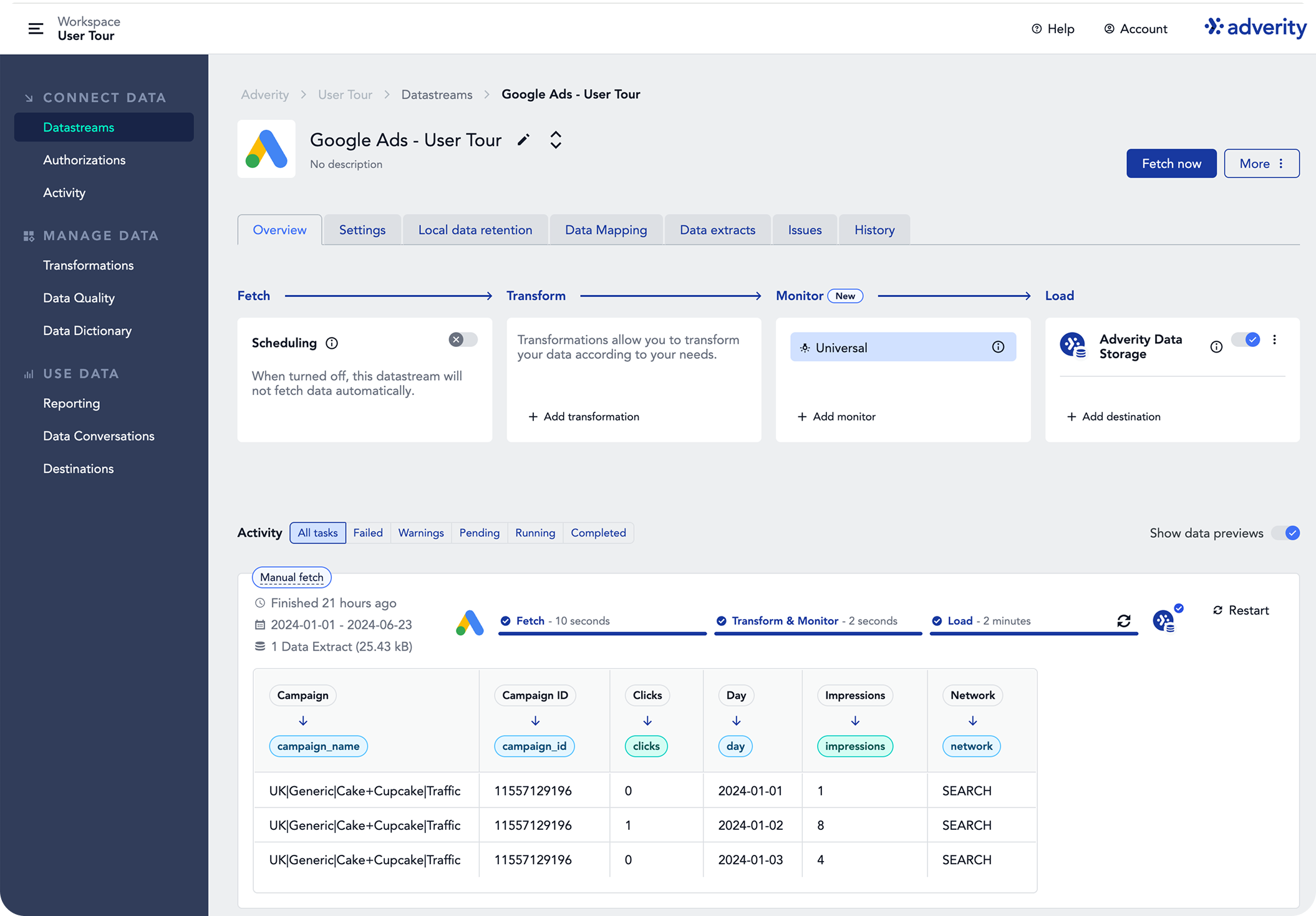
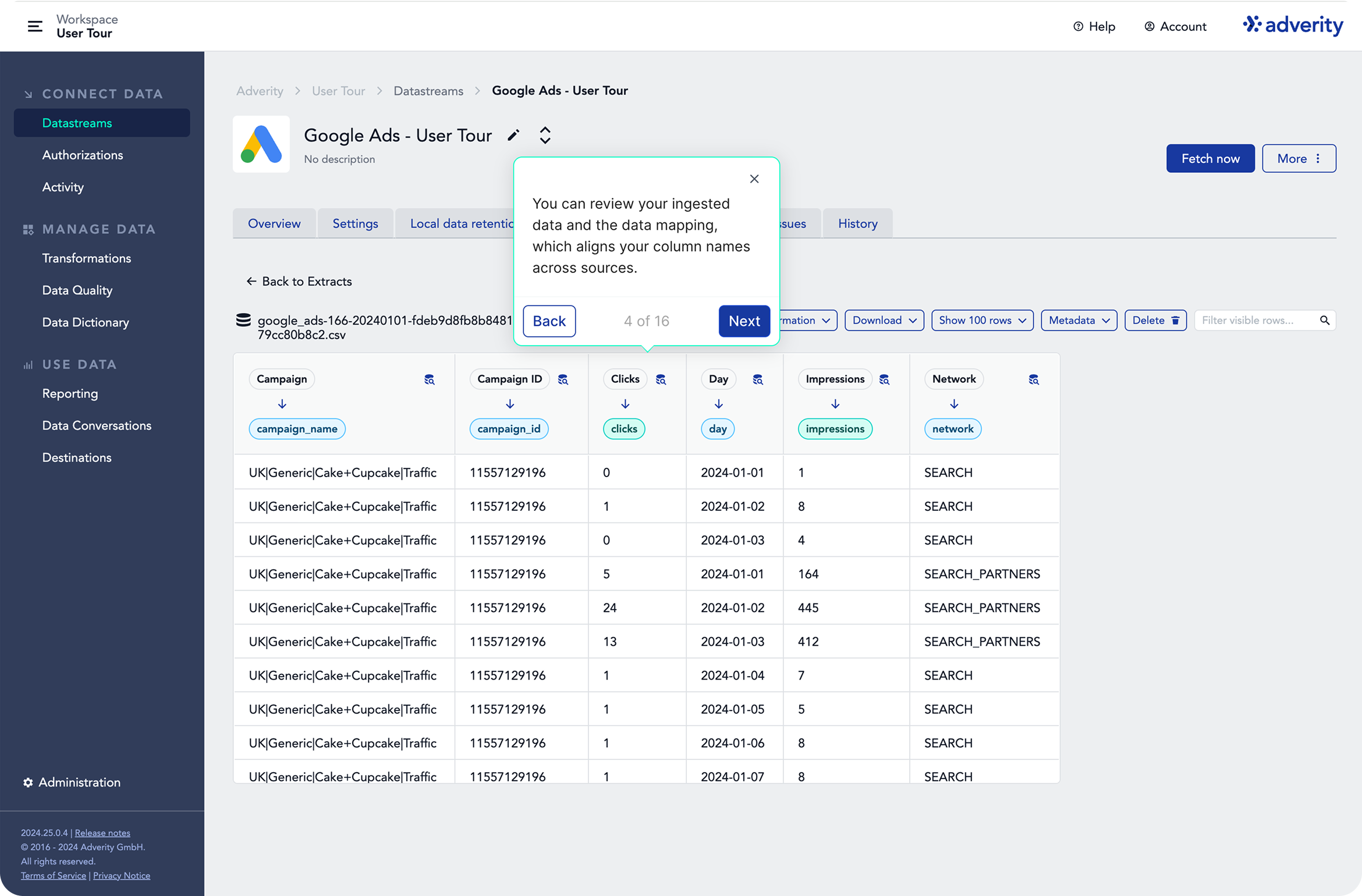
Each column header includes a mapping chip that shows the current target field (e.g. campaign_name, clicks). Clicking the chip lets users remap or create a new target in a drawer, view usage across datastreams, or apply defaults; unmapped columns get flagged. By bringing mapping into the data preview, users stay in context - no schema page hopping - and edits apply immediately, reducing errors.
Onboarding & Guided Tours
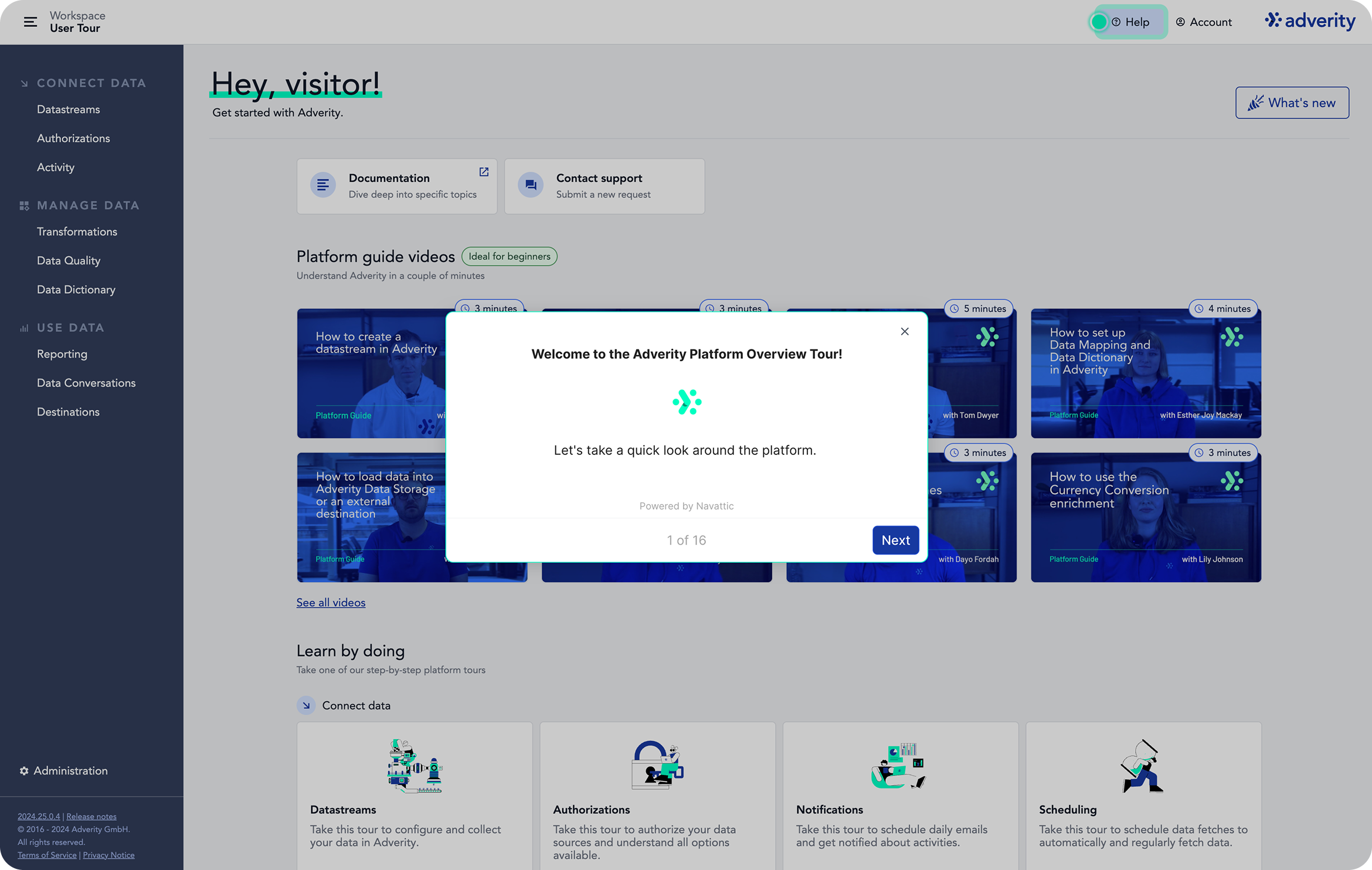
To reduce ramp-up time, we paired the feature with first-time-user education. I designed the new Welcome page and placed a short “How to set up Data Mapping” video front-and-centre, along with a guided tour, so newcomers quickly grasp source vs. target fields and start using defaults with confidence.
The in-product guided tour teaches first-time users how to review ingested data and verify or adjust data mapping directly in the table. It uses short, contextual steps (progressive disclosure) to show how default mappings align column names across sources, how to spot unmapped fields, and how to create or edit target fields in a drawer without leaving the page.
A further step introduces the Data Dictionary as the central place to govern target fields and keep schemas consistent across sources, explaining how to create your own targets and use filters (used/unused, dimensions/metrics, data sources) to audit coverage. A follow-up step opens a usage drawer showing where a target is applied across datastreams, helping users spot inconsistencies, prevent naming drift, and build confidence in shared standards.
Impact
Cross-functional ideation sessions set the foundation for concrete design and product decisions, aligning business needs with user behaviour patterns - and positioned the Data Mapping flow as a strategic UX lever in data harmonization. After 3 discovery sessions we had a scoped, staged delivery plan that aligned on quick wins first while setting up larger structural changes. Over the next two sessions I produced high-fidelity designs; after five sessions in total, we kicked off implementation.
The feature made data mapping feel like a seamless, natural part of the data setup process rather than a confusing and disconnected technical task. By improving visibility, guidance, and usability, these enhancements helped increase adoption of default schemas, reduce manual effort, and ensure data consistency across destinations.
The resulting feature - especially in-context mapping from the data-extract header - exceeded customers' expectations and drew highly positive feedback from multiple clients.